SoftwareMarketingIntelligenceResourcesContact
Apply now Sign in
Annex A/Paintball booking software

Paintball booking software that fills your weekends.

Players decide on Thursday night what they're doing Saturday. If booking your field means calling during business hours, a lot of them never call. They book whatever is easiest.

PBHQ is booking software built only for paintball fields. Players book, pay, and sign their waivers from their phone without ever calling you. That's how weekends fill up.

The demo is a real booking page. No login, no sales call, and no card gets charged.

  • Built only for paintball
  • Live the day you sign up
  • Money goes to your own Stripe or Square
  • We do the setup and take the support calls
Definition

What is paintball booking software?

Short answer · Booking softwareRef. A

Paintball booking software lets players reserve a game, pick their rental gear, pay a deposit, and sign a waiver online, any time of day. The field gets a live schedule, a player list, and payments in one place instead of phone calls, paper waivers, and a spreadsheet.

Most booking software is built for dozens of industries and adjusted to fit paintball. PBHQ was built for paintball fields first, by people who have run them.

Live demo/Open now

Try it yourself. No sales call.

You shouldn't have to sit through a sales pitch to find out if software works. Our demo field is live right now.

01 · Player side

Book a game as a player.

Pick a date, choose your gear, and check out. Demo mode, so no card gets charged.

02 · Owner side

Look around as the owner.

See the bookings, waivers, events, and reports from the other side. Request access and we'll email you a login.

The demo resets every hour, so click anything you want.

A-1/Gate · Online booking

Paintball online booking that works at midnight

Most bookings don't happen during business hours. They happen on the couch on a Thursday night. PBHQ keeps your field open for booking around the clock, so a player who's ready to commit can do it right then.

Players pick open play or a party package, choose a date and time, select their rental gear, and pay. It works in any phone browser. Nobody has to download a paintball booking app.

  • Walk-on open play, private parties, and per-game sessions
  • Paintball, airsoft, and laser tag built in, plus any activity you add, like gellyball
  • Live rental inventory, so you never sell more markers than you own
  • Add-ons at checkout: paint, air fills, food, extra rentals
  • Take a gear deposit or the full amount up front
  • Booking right on your own website, or a link you share anywhere
  • Discount codes for promos and returning players
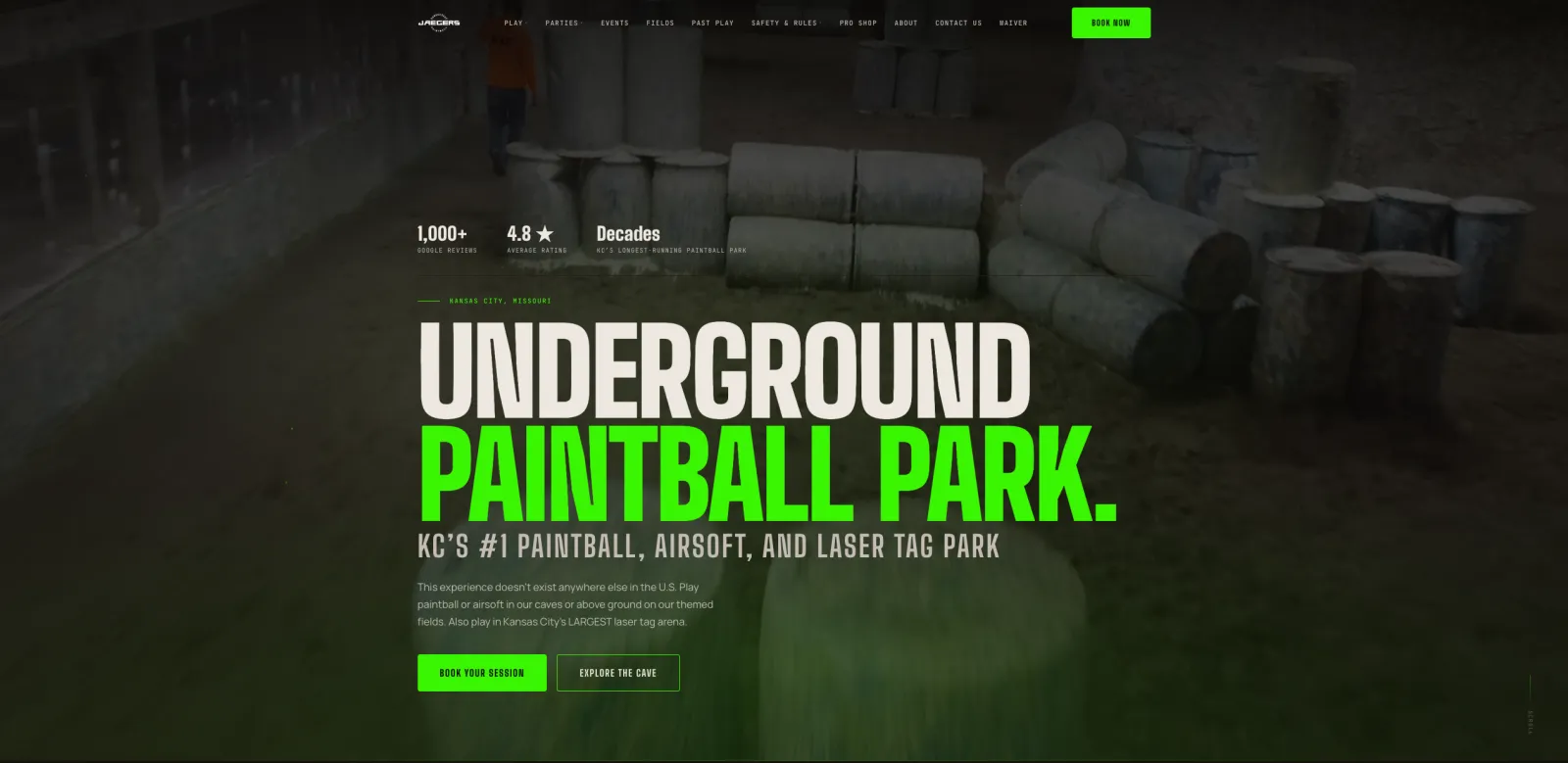
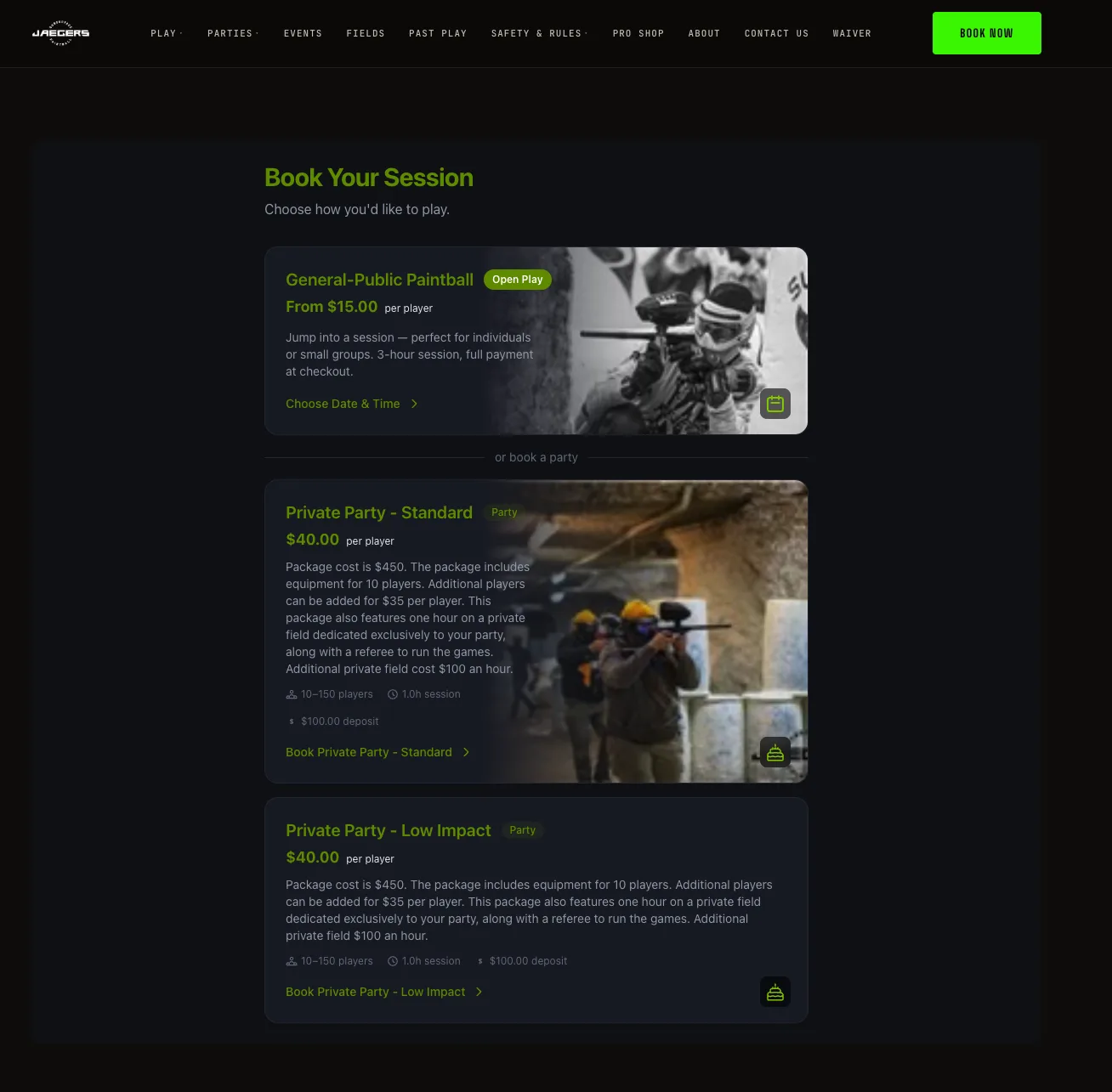
A paintball field's own website with PBHQ booking embedded on the page.
A paintball field's Book Your Session page: an open-play card from $15 per player with a Choose Date & Time link, then two private party packages at $40 per player with player range, session length, and deposit.
Fig. 1 · Booking on your own site
A-2/Gate · Parties and groups

Party and group bookings without the phone tag

Birthday parties, youth groups, bachelor parties, company outings. Group bookings are some of the best money a field makes, and the hardest to book by phone. The organizer has to check with everyone, and the call back never comes.

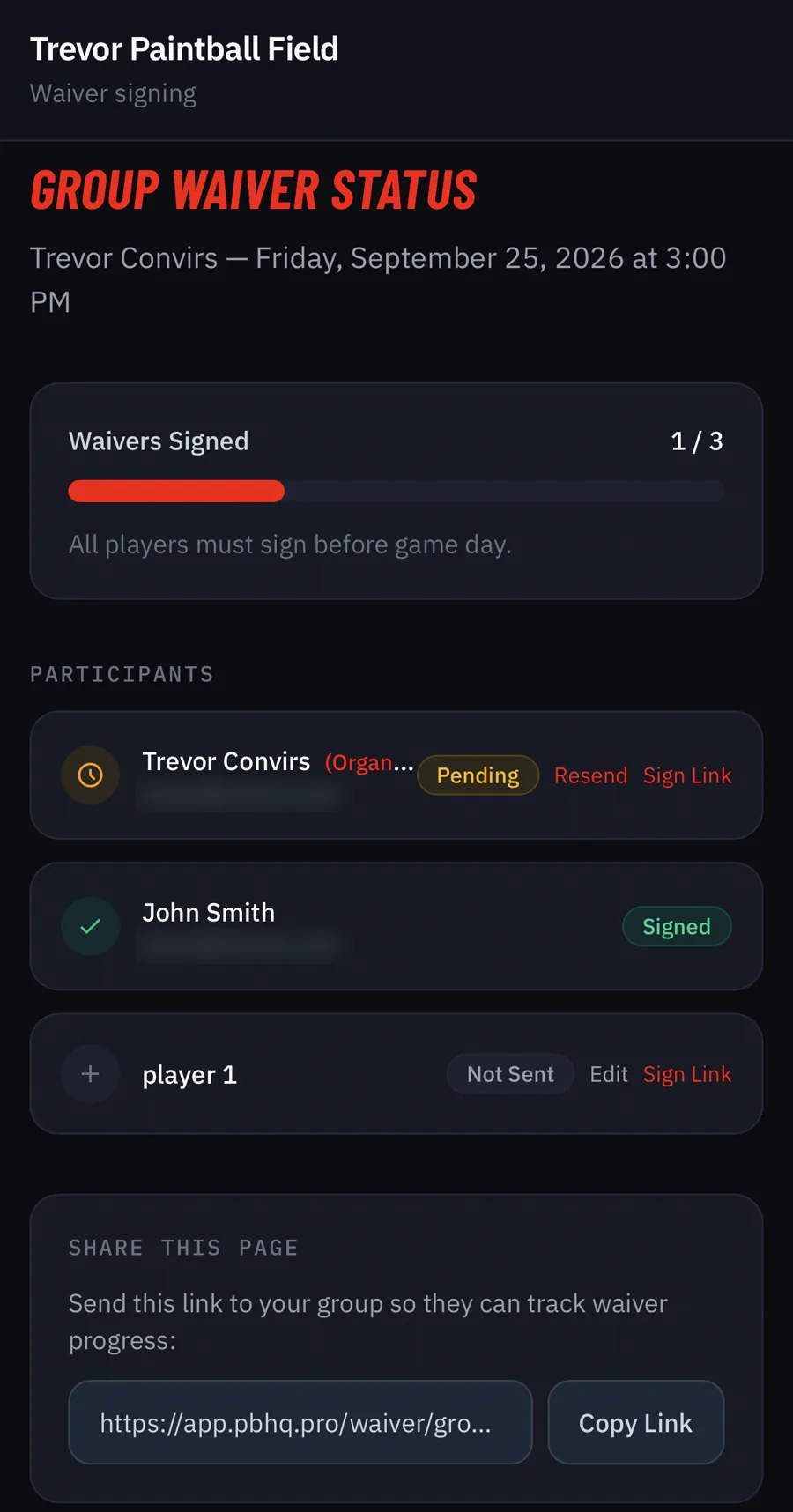
With PBHQ the game organizer books the party online, pays the deposit, and gets one waiver link to send the whole group. They can see who has signed. So can you.

  • Price packages per player, as a flat rate, or by gear tier, with an optional field rental fee
  • Take a deposit or let them pay in full, with the balance due on game day
  • Set booking hours for each package
  • Assign play areas and cap how many parties run at once, so two groups never land on the same field
  • Let groups add extra hours
  • A parent booking their kid's party isn't counted as a player
  • Staff can book call-ins and email the organizer a payment link
  • The organizer can fill in guest names and resend waiver links without calling you
Group Waiver Status page on a phone: a party booking showing 1 of 3 waivers signed, a player list marked Pending, Signed, and Not Sent with Resend and Sign Link buttons, and a Copy Link button to share the page with the group.
Fig. 2 · Group waiver status
A-3/Staging · Waivers

Digital waivers that handle kids, regulars, and walk-ins

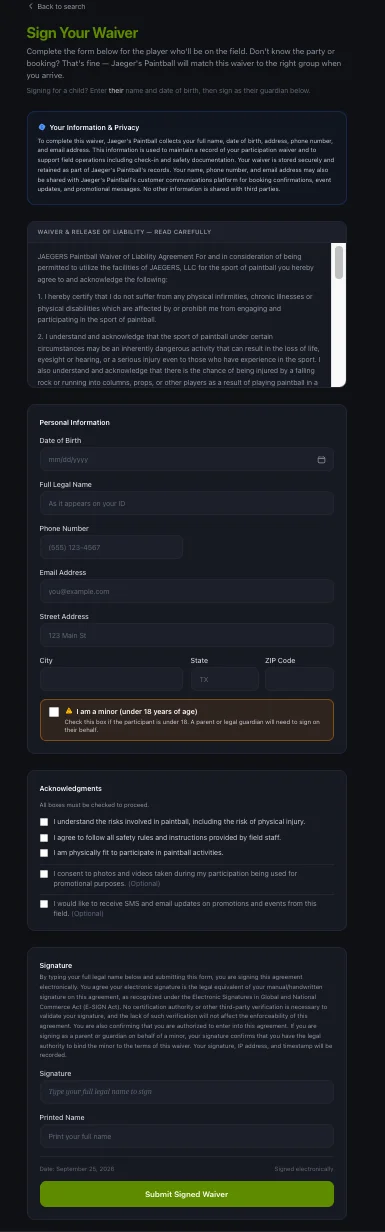
Every booking sends waiver links automatically. Players sign on their phone before they leave the house, and the signed PDF is saved to their player record.

  • The player's date of birth decides who signs. Minors are signed for by a parent or guardian.
  • Returning players don't retype everything. Their details carry over from their last waiver.
  • A parent with two kids signs one, then the next, without starting over.
  • No booking? Players can still sign from your waiver page, and staff add them to a party later.
  • Paper waivers at the counter can be recorded too.
A Sign Your Waiver form on a phone with the liability agreement, personal information, acknowledgment checkboxes, and a typed electronic signature.
Fig. 3 · Digital waiver
A-4/Staging · Check-in

Check-in that keeps the line moving

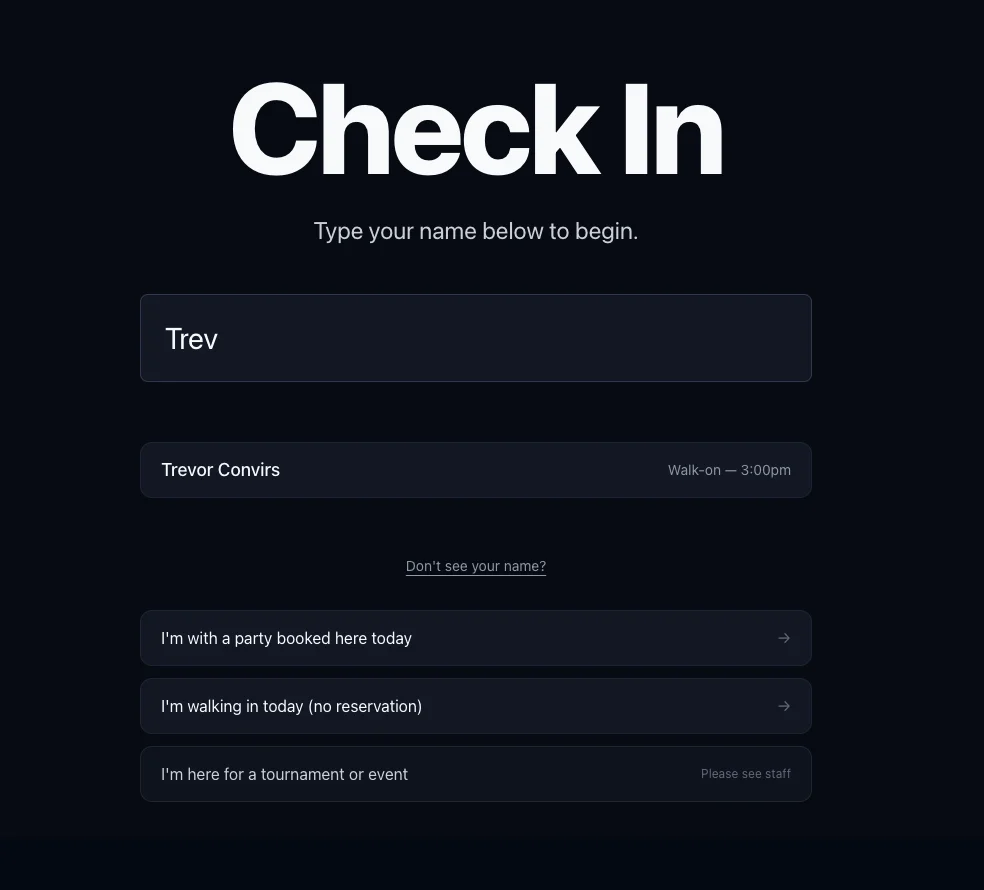
Put the check-in kiosk on any tablet or laptop at the gate. Players search their name, sign anything they missed, and check themselves in. Party guests pick their party from a "Here for a party today?" list.

Walk-ins sign their waiver right at the kiosk and land in the same player list as everyone else. Staff can check players in from the dashboard too.

A tablet showing the Check In kiosk: a player has typed Trev and their booking, Walk-on at 3:00pm, appears below. Under Don't see your name? are options for a party booked today, walking in with no reservation, or a tournament or event.
Fig. 4 · Check-in kiosk
A-5/Field 1 · EventsField Ops

Paintball event management for Big Games and tournaments

A Big Game or tournament can be your biggest weekend of the year. It can also turn into spreadsheets, paper sign-ups, and chasing payments. PBHQ runs event registration and ticketing in the same system as your everyday bookings.

  • Online registration and ticketing for Big Games, tournaments, and scenario games
  • Big Game players pick their side. Tournament teams register and manage their own rosters.
  • Capacity is counted live. An unpaid checkout never holds a spot.
  • Events reserve the play areas they need, so nobody books over them
  • One event page with the schedule, rules, and what to bring
  • Your events list on your own website
  • Multi-day events
  • Message every registered organizer at once
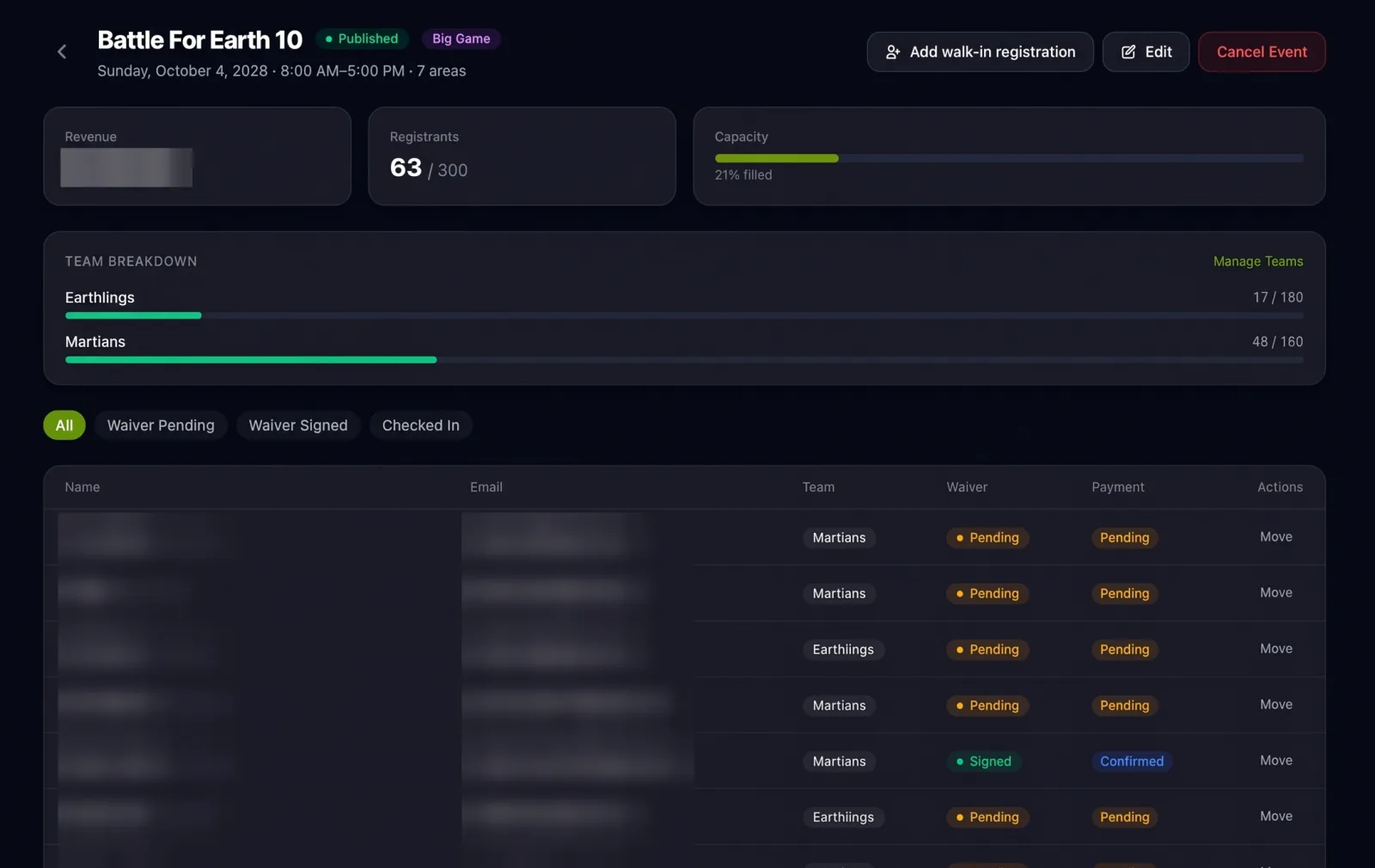
Event dashboard for a Big Game called Battle For Earth 10: 63 of 300 registrants, capacity 21% filled, a team breakdown of Earthlings 17 of 180 and Martians 48 of 160, and a registrant list with each player's team, waiver status, and payment status. Player names and emails are blurred.
Fig. 5 · Event management
A-6/HQ · Payments

Payments go to your account, not ours

PBHQ connects to the Stripe or Square account you already have. When a player pays, the money goes to you. We don't hold it, and there's no payout schedule to wait on.

  • Deposits, game-day balances, and full payments
  • Sales tax handled at checkout
  • Staff can send a payment link for any booking
  • Players who leave checkout get an email link to finish booking (Field Ops)
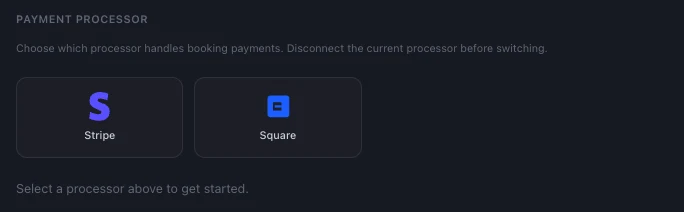
PBHQ payment processor settings: choose which processor handles booking payments, with Stripe and Square as the two options.
Fig. 6 · Payment setup
A-7/HQ · Player list

A player list that brings people back

Every player who books or signs a waiver lands in your player list, with their bookings and waivers in one place. That list is one of the most valuable things your field owns. PBHQ puts it to work.

On both plans

  • Reminder emails 24 hours and 2 hours before game time
  • Text confirmations and waiver reminders
  • Unlimited email, including email blasts to your players
  • One email to every organizer booked on a day, like a weather update
  • Emails come from your field's name, not ours

On Field Ops

  • Seven automatic emails you switch on: review request, first-timer follow-up, win-back, birthday, kid's birthday party, party rebook, and missed-booking follow-up
  • 1,000 texts a month: text or email any player from their player page, or text a whole day's organizers at once
Fig. 7 · Sample follow-ups
A-8/HQ · ReportsField Ops

Know which ads are booking games

Most fields can't tell you which ad, post, or flyer booked last Saturday's party. PBHQ can. Every booking records where the player came from, and players can tell you where they heard about you at checkout.

  • Bookings by source and by ad campaign
  • Meta Pixel and Conversions API tracking on your booking pages
  • A landing page built for your ads to point at
  • Share & Earn: players post that they're playing at your field, staff check it at the counter, and they get a perk you pick

Revenue, bookings, player counts, and CSV export are on both plans.

Want us to run the ads too? See PBHQ Marketing →

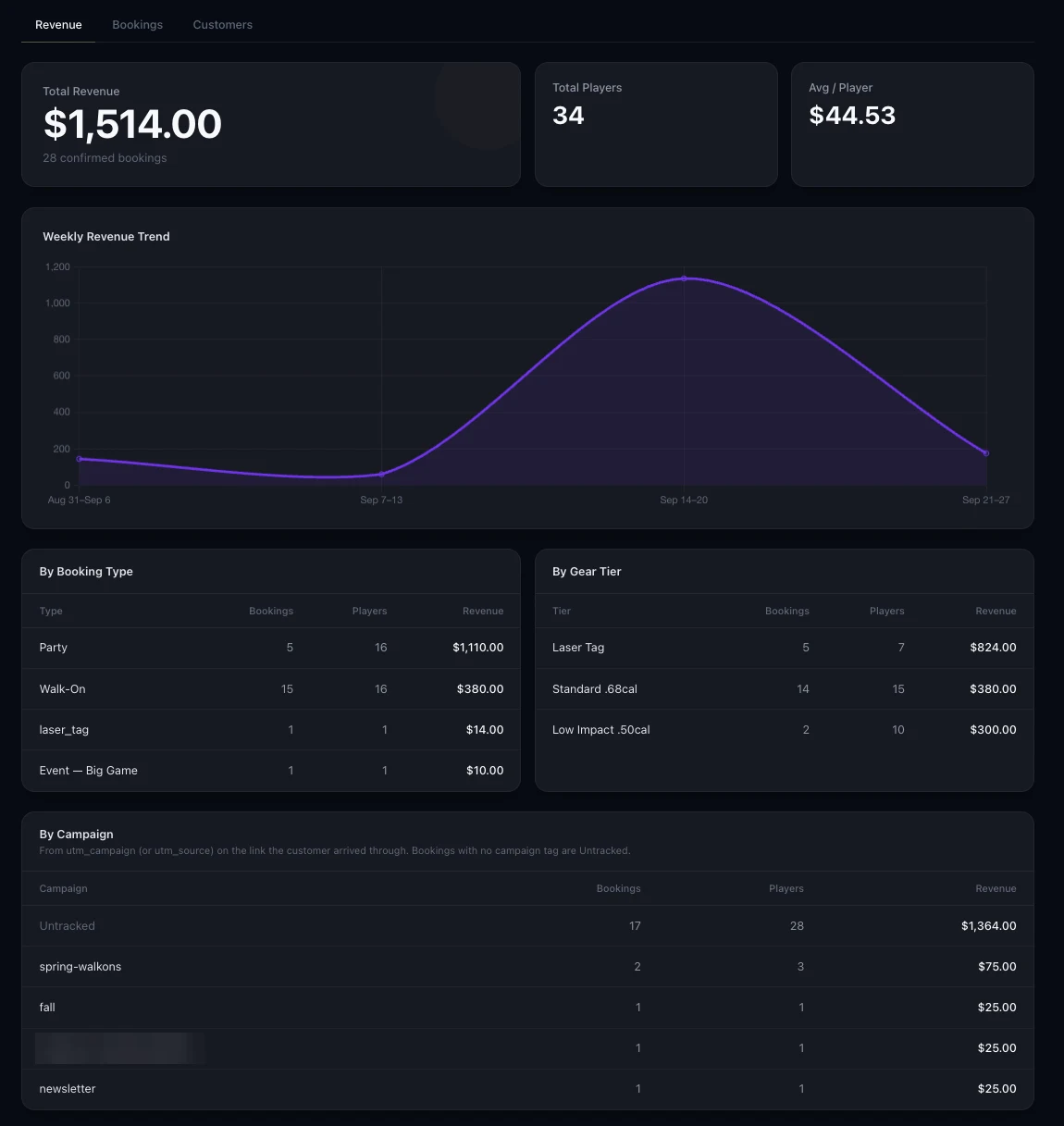
PBHQ revenue report: total revenue of $1,514.00 from 28 confirmed bookings, 34 total players, and $44.53 average per player; a weekly revenue trend chart from late August to late September that peaks the week of September 14; revenue broken down by booking type, led by parties at $1,110 and walk-ons at $380, and by gear tier; and a By Campaign table attributing bookings to the campaign link each customer arrived through.
Fig. 8 · Reporting dashboard
Live demo/Open now

That's the tour. Now click through it yourself.

Book a game on our demo field the way your players would. Want the owner side too? Request access and we'll email you a login.

Checklist/Before you sign up

Paintball booking software buyer's checklist

Whatever you choose, ask these before you sign up.

Buyer's checklist · 13 questionsPBHQ answers
Question to askPBHQ
Was it built for paintball, or adapted from something else?Built for paintball fields only
Does it track rental gear so you can't overbook markers?Yes, live
Can an organizer book a party, pay a deposit, and send one waiver link?Yes
Can parents sign waivers for minors?Yes. Date of birth decides who signs
Can it run Big Games and tournaments with teams and capacity limits?Yes (Field Ops)
Where does the money go?Your own Stripe or Square account
Is there a fee on your players?Your choice. None on Outpost. About 90¢ on a $45 booking with Field Ops
Can players book from your website?Yes, embedded or by link
Does it bring players back after their first game?Email blasts on both plans. Automatic follow-ups and texting on Field Ops
Can you see which ads booked a game?Yes, by source and campaign (Field Ops)
How fast can you start taking bookings?The day you sign up
Will they move your existing data?Yes, within 24 hours
Who answers the phone when something comes up?We do
Pricing/Two plans

Paintball booking software pricing

Two plans. One flat monthly price, or $0 a month with a small booking fee your players pay. We set up everything and take the support calls on both.

Plan 01Flat monthly

Outpost

$70a month

Run your field. One flat price, no booking fees.

Booking

  • Online booking for open play, parties, and per-game
  • Paintball, airsoft, laser tag, and gellyball, plus any activity you add
  • Party packages with deposits, play areas, and party caps
  • Rental gear tiers with live inventory tracking, so you never overbook
  • Booking on your own website
  • Discount codes
  • Staff bookings and payment links

Waivers and check-in

  • Digital waivers for adults and minors, saved as PDFs
  • Group waiver links for parties
  • Check-in kiosk and QR check-in

Payments and email

  • Payments to your own Stripe or Square, with sales tax
  • Booking confirmations, reminder emails, and texts
  • Unlimited email, including email blasts

Reports and support

  • Bookings and revenue reports, with CSV export
  • Setup, migration, and support from us
Plan 02Every feature

Field Ops

$0a month

Run your field and grow it. Every feature, plus every new one we build.

Players pay a 2% booking fee when they book online. On a $45 package that's about 90 cents. You don't pay it, and your prices don't change. Closed for the winter? No fees.

Everything in Outpost, plus:

Bring players back

  • Seven automatic follow-up emails: review request, first-timer, win-back, birthday, and more
  • Abandoned booking recovery
  • 1,000 texts a month, one-to-one and group texts

Events

  • Big Games and tournaments with teams, sides, and live capacity

Grow

  • Ad tracking: bookings by source and campaign
  • Ad landing pages
  • Share & Earn

Every update

  • Every new feature as it ships

We only get paid when you get booked.

Want one flat monthly price? Go with Outpost. Want $0 a month and every feature? Go with Field Ops. It's your call.

What Field Ops costs over a year2% booking fee
Online bookings in a yearYou payYour players pay (total)Per player ($45 package)
$25,000$0$50090¢
$50,000$0$1,00090¢
$100,000$0$2,00090¢

No matter how busy you get, it's still about 90 cents a player.

The booking fee shows on its own line at checkout, labeled Booking fee, before the player pays. It only applies to bookings paid online, never walk-ups or anything paid at the field. Card processing is billed by Stripe or Square at their normal rates. Unlimited email is subject to fair use.

On the wayGift cards, memberships, a member app, and staff scheduling.
Switchover/Already using something?

Switching booking systems? We do the moving.

Most fields we talk to already have a booking system, even if it's a phone and a clipboard. Switching sounds like a week of data entry. It isn't, because we do it for you.

  1. Step 1

    Apply

    Tell us about your field and the booking system you use today.

  2. Step 2

    We build it

    We set up every booking type you run, your rental inventory, your add-ons and upsell items, and your waivers. It takes about 2 hours.

  3. Step 3

    We move your data

    Your player list, signed waivers, and upcoming bookings come over from your old system within 24 hours.

  4. Step 4

    You go live

    Booking goes on your own website, or anywhere you share the link. We take the support calls from there.

Nothing for players to download and no hardware to buy. Booking works in any phone browser, and any tablet or laptop can be your check-in kiosk.

Field report/What field owners say

What field owners say

PBHQ has been amazing to deal with. They give us everything we need from a booking system and always find a solution for any problems that come up at check-in.

Sam Latier, Owner, Jaegers Subsurface Paintball, Kansas City, MO
Command/Who built it

Built by people who've run paintball fields

Trevor Convirs grew up in paintball, helping run The Bunker and Oklahoma D-Day alongside his dad, Dewayne. Then he spent nearly a decade as a senior software engineer at Jack Henry, building financial software for banks and credit unions. PBHQ comes out of both.

We know what an empty Saturday feels like. We built PBHQ so fewer fields have to find out.

Founder
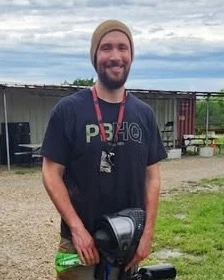
Trevor Convirs at a paintball field holding his mask and marker
Trevor Convirs
Industry advisor
Dewayne Convirs driving a military jeep at a paintball event
Dewayne Convirs
FAQ/17 questions

Paintball booking software FAQs

What is paintball booking software?

It lets players book a game, pick rental gear, pay, and sign a waiver online, any time. The field gets one place for its schedule, player list, and payments instead of phone calls and paper.

How fast can my field start taking bookings?

The same day. Your booking page is live as soon as you sign up. Our white glove setup, where we build out your packages, gear, and waivers for you, takes about 2 hours.

Can you move my data from my current booking system?

Yes. We move your player list, signed waivers, and upcoming bookings within 24 hours.

Who handles setup and support?

We do. We set up everything for your field and we take care of the support calls.

Do players need to download an app?

No. Booking, waivers, and payment all work in any phone browser.

Can I put booking on my own website?

Yes. Embed booking and your events list right on your site, or share a link on Facebook, Google, and your ads.

Can parents sign waivers for their kids?

Yes. The player's date of birth decides who signs. Minors are signed for by a parent or guardian, and a parent with more than one kid can sign for each without starting over.

Can I take deposits on parties?

Yes. Set a deposit per package, or let the organizer pay in full. The balance is due on game day.

Can I run Big Games and tournaments?

Yes, on Field Ops. Players register online, pick their side or join a team, and capacity is tracked live so you never oversell.

Where does the money go?

Straight to your own Stripe or Square account. PBHQ never holds your revenue.

How much does PBHQ cost?

Outpost is $70 a month with no booking fees. It covers online booking, live rental inventory, waivers, a check-in kiosk, email, and reports. Field Ops is $0 a month with every feature. Players pay a 2% booking fee when they book online, about 90 cents on a $45 package.

Is the booking fee hidden?

No. It's listed on this page, and it shows on its own line at checkout, labeled Booking fee, before the player pays.

Is there a fee on walk-ups or anything paid at the field?

No. The booking fee only applies to bookings paid online.

What do I pay in the winter?

On Field Ops, nothing. No online bookings, no fee.

What if I don't want my players paying a fee?

Go with Outpost. It's a flat $70 a month with no booking fees.

What if I need more than 1,000 texts?

Most fields never use 1,000 in a month. If you send a big text blast, extra texts are $20 per 1,000. We'll let you know before you go over.

Does it work for airsoft and laser tag?

Yes. Paintball, airsoft, and laser tag are built in, and you can add your own activities, like gellyball.
Deploy

Your field should be booked solid every weekend.

Not ready to apply? Book a game on the demo field first. No login, no sales call.